Dota Minimap Analyzer
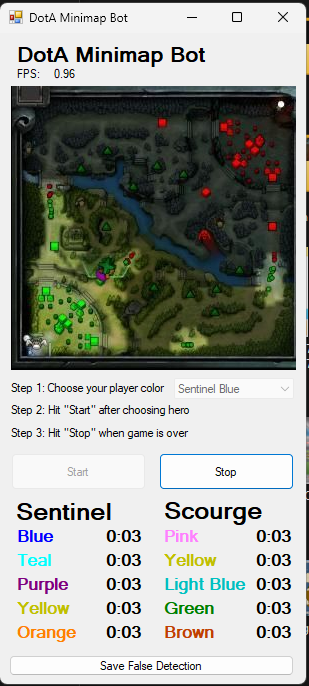
I built a tool to help track when enemy heroes are missing from the minimap in Dota. Since the game does not show when heroes are not visible on the map, this application monitors the minimap and displays timers for how long each enemy has been missing.
The Problem
In Dota, knowing when enemy heroes are missing from vision is crucial for avoiding ganks and making safe plays. The game only shows heroes when they are in vision range or have been spotted by wards. When an enemy disappears from the minimap, there was no built-in way to track how long they had been gone.
The Solution
I created a Windows Forms application using C++/CLI (managed C++ for .NET interop) that captures the Dota game screen, analyzes the minimap region using OpenCV, and tracks the last known positions and timers for each enemy hero.
Technical Implementation
Architecture
The application consists of several key components:
- FrameGrabber: Captures screen frames from the Dota window at regular intervals
- FrameGrabberAnalyzer: Processes each frame to extract minimap information
- PlayerDetector: Uses colour-based detection to identify player positions on the minimap
- StateAnalyzer: Tracks player presence/absence over time and calculates MIA durations
- Windows Forms GUI: Displays the MIA timers for each enemy hero with labels for all 10 players (5 Sentinel, 5 Scourge)
Colour-Based Detection
Since Dota uses distinct colours for each player on the minimap, I could leverage HSV colour space filtering to detect hero positions. The Constants.h file contains the carefully calibrated colour ranges for each player:
- Sentinel team: Blue, Teal, Purple, Yellow, Orange
- Scourge team: Pink, Yellow, Light Blue, Green, Brown
1
2
3
4
5
6
// Example colour ranges from Constants.h
const Scalar SENTINEL_BLUE_LOW(218 / 2, 0.54 * 255, 0.70 * 255);
const Scalar SENTINEL_BLUE_HIGH(250 / 2, 0.84 * 255, 1.0 * 255);

const Scalar SCOURGE_PINK_LOW(329 / 2, 0.46 * 255, 0.45 * 255);
const Scalar SCOURGE_PINK_HIGH(330 / 2, 0.51 * 255, 255);
The detection algorithm:
- Isolates the minimap region based on screen aspect ratio (16:9 or 16:10)
- Applies colour thresholding for each player’s colour range
- Finds contours and calculates convex hulls for detected regions
- Filters based on minimum area to avoid false positives
- Tracks positions across frames to determine when a hero has disappeared
MIA Tracking Logic
The StateAnalyzer maintains the last known position for each player. When a player’s minimap icon disappears, the timer starts. When they reappear, the timer resets. The application displays these timers prominently for the enemy team.
Development Stack
- Language: C++/CLI (Common Language Infrastructure - managed C++ for .NET interop)
- Framework: Windows Forms for the GUI
- Computer Vision: OpenCV 2.x for image processing
- IDE: Visual Studio 2010