Jenkins Pipeline for Spring with Beta and Prod Stages and Deployment Rollback

This post is recreated from the original at https://blog.henrypoon.com/blog/2017/03/09/jenkins-pipeline-for-spring-with-beta-and-prod-stages-and-deployment-rollback/
In the past couple of days, I have been experimenting with the Jenkins pipeline plugin to create a code deployment pipeline with independent beta and prod stages for a Spring Boot app. I even managed to add rolling back a deployment in case a prod deployment fails! It took me some time to work through how to do everything, so I am laying it all out here in case it helps other people do the same thing.
The nice thing about all of this is that I can push a code change to git, and Jenkins can build it, run through all the tests, and then deploy to production automatically.
Layout of a Pipeline Script
Pipeline scripts are written in Groovy, which is a variant of Java. In general, a pipeline script is laid out like this:
1
2
3
4
5
6
7
8
9
10
11
12
13
14
node {
    def SOME_CONSTANT = "whatever"
    ...

    stage('some stage name like Build') {
        // Stuff to do as a part of this stage
    }

    stage('another stage') {
        // More stuff
    }

    ...
}
Each stage represents a stage in the pipeline (e.g., building, beta deployment, prod deployment, etc.)
Defining Constants
First, constants can be defined that can be used throughout the pipeline. This makes it easier to reuse the pipeline script elsewhere - only these constants have to be changed.
My project uses Maven, so Jenkins downloads its own copy of Maven to execute builds. I have defined it as a constant with the name “Maven 3.3.9” exactly as configured in Jenkins Global Tool Configuration. My project also uses Tomcat, so there are some Tomcat-specific things in there as well.
1
2
3
4
5
6
7
8
9
def MAVEN_HOME = tool 'Maven 3.3.9'
    def WORKSPACE = pwd()

    def PROJECT_NAME = "name-of-project"
    def WAR_PATH_RELATIVE = "App/target/${PROJECT_NAME}.war"
    def WAR_PATH_FULL = "${WORKSPACE}/${WAR_PATH_RELATIVE}"
    def TOMCAT_CTX_PATH_BETA = "Tomcat-context-path-for-the-beta-stage"
    def TOMCAT_CTX_PATH_PROD = "Tomcat-context-path-for-the-prod-stage"
    def GIT_REPO_URL = "URL-to-git-repo-ending-in-.git"
Preparation Stage
First, the code has to be retrieved from the repository before it gets built. Jenkins allows storing username/password pairs as credentials so they can be referenced without writing out the password in plaintext. Jenkins uses a “credential ID” for this.
1
2
3
4
5
    stage('Preparation') {
        git branch: "master",
        credentialsId: "credentials-ID-stored-in-Jenkins-that-can-access-the-git-repo",
        url: "${GIT_REPO_URL}"
    }
Build Stage
Next, the code must be built and unit tested. mvn clean install will do this. The junit command processes the resulting XML generated during the build and posts a graph of how many tests were run for each build.
1
2
3
4
    stage('Build') {
        sh "'${MAVEN_HOME}/bin/mvn' clean install"
        junit '**/target/surefire-reports/TEST-*.xml'
    }
Beta Stage
Once the build succeeds, you will want to deploy it to a beta environment for integration tests. The following happens at this stage:
- Get the right credentials to access Tomcat
- Call the deploy method to deploy the war file in Tomcat (more on that later)
- If the deployment fails, print out the deployment log for debugging and fail the build
- If the deployment succeeds, run the integration tests
1
2
3
4
5
6
7
8
9
10
11
12
13
14
15
16
17
18
19
20
21
22
    stage('Beta') {
        withCredentials([[$class: 'UsernamePasswordMultiBinding',
            credentialsId: 'credential-id-for-tomcat',
            usernameVariable: 'USERNAME', passwordVariable: 'PASSWORD']]) {
                // Password is available as an env variable, but will be masked
                // if you try to print it out
                def output = deploy(WAR_PATH_FULL, TOMCAT_CTX_PATH_BETA,
                        env.USERNAME, env.PASSWORD)
                if (output.contains("FAIL - Deployed application at context path " +
                        "/${TOMCAT_CTX_PATH_BETA} but context failed to start")) {
                    echo "----- Beta deployment log -----"
                    echo output
                    echo "-------------------------------"
                    currentBuild.result = 'FAILURE'
                    error "Beta stage deployment failure"
                }
            }

        echo "Running integration tests"
        sh "'${MAVEN_HOME}/bin/mvn' -Dtest=*IT test"
        junit '**/target/surefire-reports/TEST-*.xml'
    }
Deploy Method
The deploy method handles the actual deployment to Tomcat, allowing Jenkins to tell Tomcat about the newly built war file:
1
2
3
4
5
6
7
8
9
10
11
12
13
14
15
def deploy(warPathFull, tomcatCtxPath, username, password) {
    def envSuffix = ""
    def isBeta = tomcatCtxPath.contains("beta")
    if (isBeta) {
        envSuffix = "beta"
    } else {
        envSuffix = "prod"
    }
    sh script: "cp ${warPathFull} ${warPathFull}.${envSuffix}"
    setSpringProfile(warPathFull, isBeta)
    def output = sh script: "curl --upload-file '${warPathFull}.${envSuffix}' " +
            "'http://${username}:${password}@localhost:8081/manager/text/deploy" +
            "?path=/${tomcatCtxPath}&update=true'", returnStdout: true
    return output
}
In my project, I am building a single war file without a Spring profile (beta/prod) defined. This means I have to manually define this before I deploy the app to Tomcat since there are some things that differ between beta and prod like database URLs. To do this, I wrote a method that opens the war file like a zip (jar/war files are zip files) and adds a line to my application.properties to define a Spring profile.
1
2
3
4
5
6
7
8
9
10
11
12
13
14
15
16
17
18
19
20
21
22
23
24
25
def setSpringProfile(warPathFull, isBeta) {
    def zipFileFullPath = warPathFull + "." + (isBeta ? "beta" : "prod")
    def zipIn = new File(zipFileFullPath)
    def zip = new ZipFile(zipIn)
    def zipTemp = File.createTempFile("temp_${System.nanoTime()}", 'zip')
    zipTemp.deleteOnExit()
    def zos = new ZipOutputStream(new FileOutputStream(zipTemp))
    def toModify = "WEB-INF/classes/application.properties"

    for(e in zip.entries()) {
        if(!e.name.equalsIgnoreCase(toModify)) {
            zos.putNextEntry(e)
            zos << zip.getInputStream(e).bytes
        } else {
            zos.putNextEntry(new ZipEntry(toModify))
            zos << zip.getInputStream(e).bytes
            zos << ("\nspring.profiles.active=" + (isBeta ? "beta" : "prod")).bytes
        }
        zos.closeEntry()
    }

    zos.close()
    zipIn.delete()
    zipTemp.renameTo(zipIn)
}
A curl command to Tomcat is what actually does the deployment:
1
curl --upload-file 'path-to-war-file' http://username:password@server-address:port/manager/text/deploy?path=/tomcat-context-path&update=true
Prod Stage
The prod stage follows the same pattern as the beta stage, with one critical addition: rollback on failure.
Rollback is important because if the deployment fails, you do not want to be stuck with a broken production environment. Since build artifacts are saved on successful deployments, these same artifacts can be brought back if future deployments fail.
1
2
3
4
5
6
7
8
9
10
11
12
13
14
15
16
17
18
19
20
21
22
23
24
25
26
    stage('Prod') {
        withCredentials([[$class: 'UsernamePasswordMultiBinding',
            credentialsId: 'credential-id-for-tomcat',
            usernameVariable: 'USERNAME', passwordVariable: 'PASSWORD']]) {
                // Password is available as an env variable, but will be masked
                def output = deploy(WAR_PATH_FULL, TOMCAT_CTX_PATH_PROD, env.USERNAME, env.PASSWORD)
                if (output.contains("FAIL - Deployed application at context path " +
                        "/${TOMCAT_CTX_PATH_PROD} but context failed to start")) {
                    echo "Prod stage deployment failure, rolling back deployment"
                    echo "----- Prod deployment log -----"
                    echo output
                    echo "-------------------------------"
                    step([$class: 'CopyArtifact',
                            filter: "${WAR_PATH_RELATIVE}",
                            fingerprintArtifacts: true,
                            projectName: "${PROJECT_NAME}",
                            target: "${WAR_PATH_RELATIVE}.rollback"])
                    deploy(WAR_PATH_FULL + ".rollback/" + WAR_PATH_RELATIVE,
                            TOMCAT_CTX_PATH_PROD, env.USERNAME, env.PASSWORD)
                    currentBuild.result = 'FAILURE'
                    error "Prod deployment rolled back"
                } else {
                    archiveArtifacts artifacts: "${WAR_PATH_RELATIVE}*", fingerprint: true
                }
            }
    }
At the end, you get something like this:
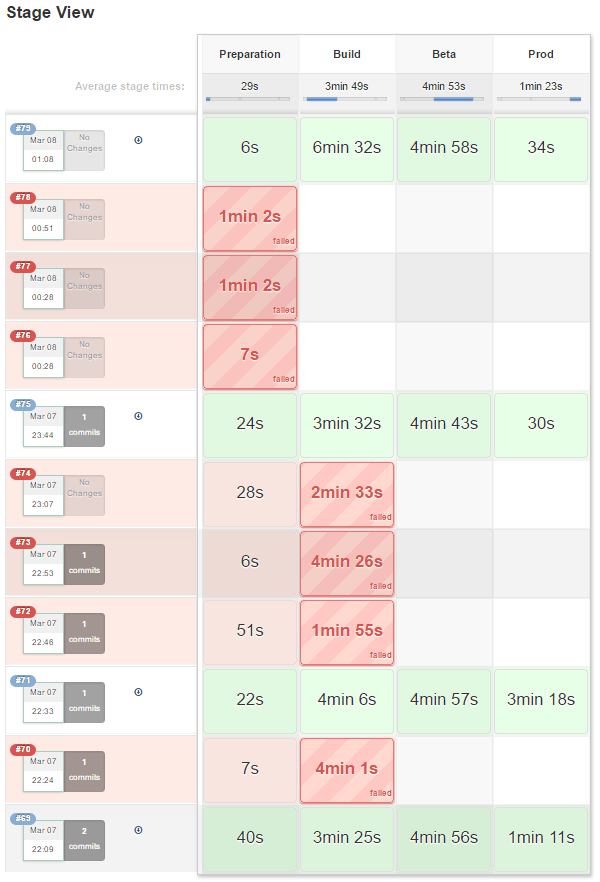
That pretty much sums up the whole Jenkins pipeline I have been using lately for Spring projects!